
Every mile and every receipt, ready for tax time.
MileAudit logs your drives automatically, scans your receipts into organized expenses, and turns both into clean, export-ready records. Stop reconstructing your year from memory — and stop missing deductions you earned.
7-day free trial · No sign-up needed for the demo · iPhone app coming soon

Your mileage log, in your pocket.
Drives are recorded in the background and land on your phone, mapped and ready. Sort them with a swipe, and scan receipts as you go.


Coming soon to the App Store · Your account works on the web today
Your mileage log builds itself.
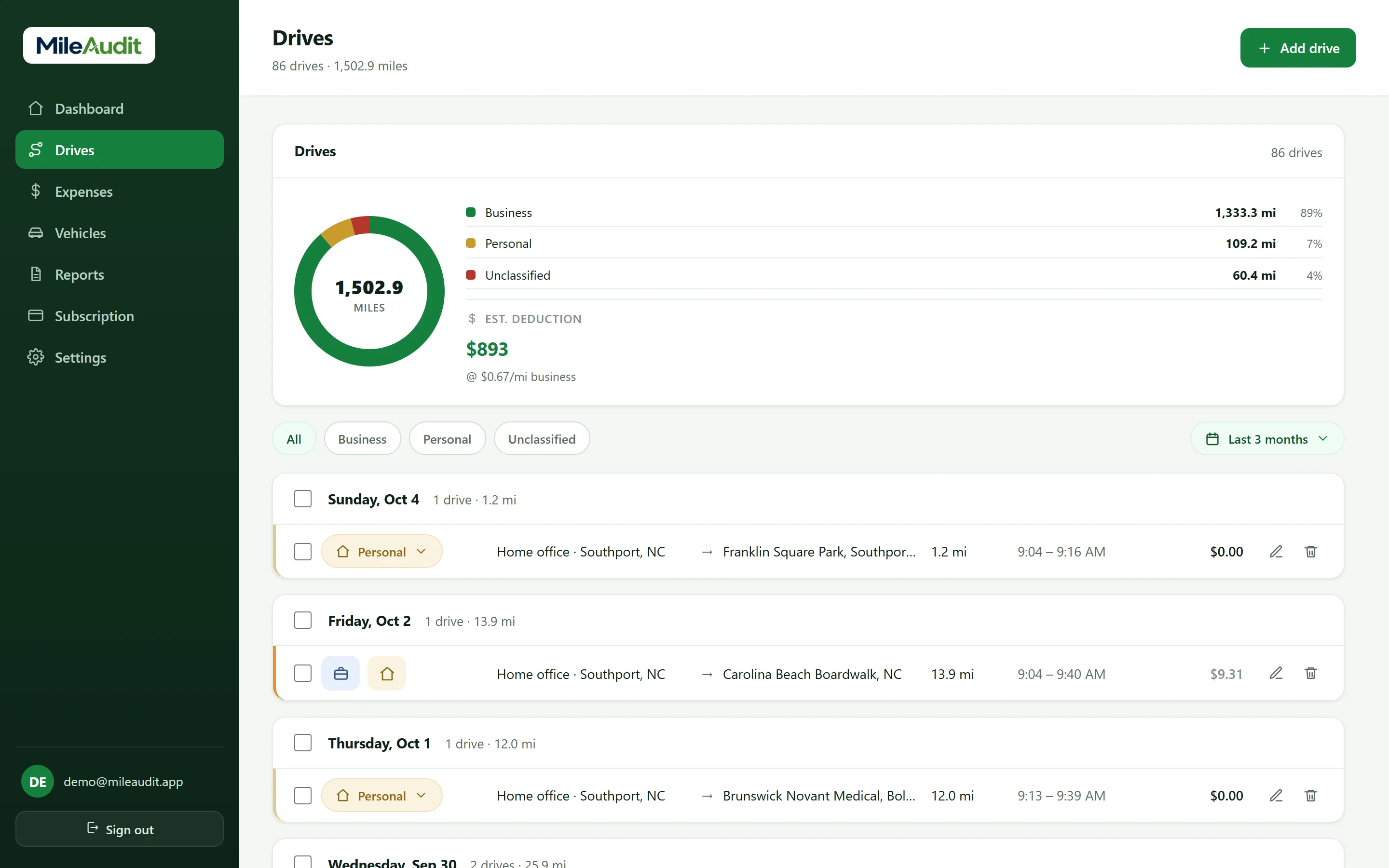
Turn on tracking once and just drive. MileAudit records each trip's route, distance, and time in the background, then waits for you to sort it.
-
Automatic drive detectionNo timer to start and no trip to forget — drives are captured as they happen.
-
Classify in a tapEach drive lands in your inbox — mark it business or personal and add a purpose.
-
Every vehicle, every routeTrack multiple vehicles, see each drive on a map, join stop-and-go trips, or add one by hand.
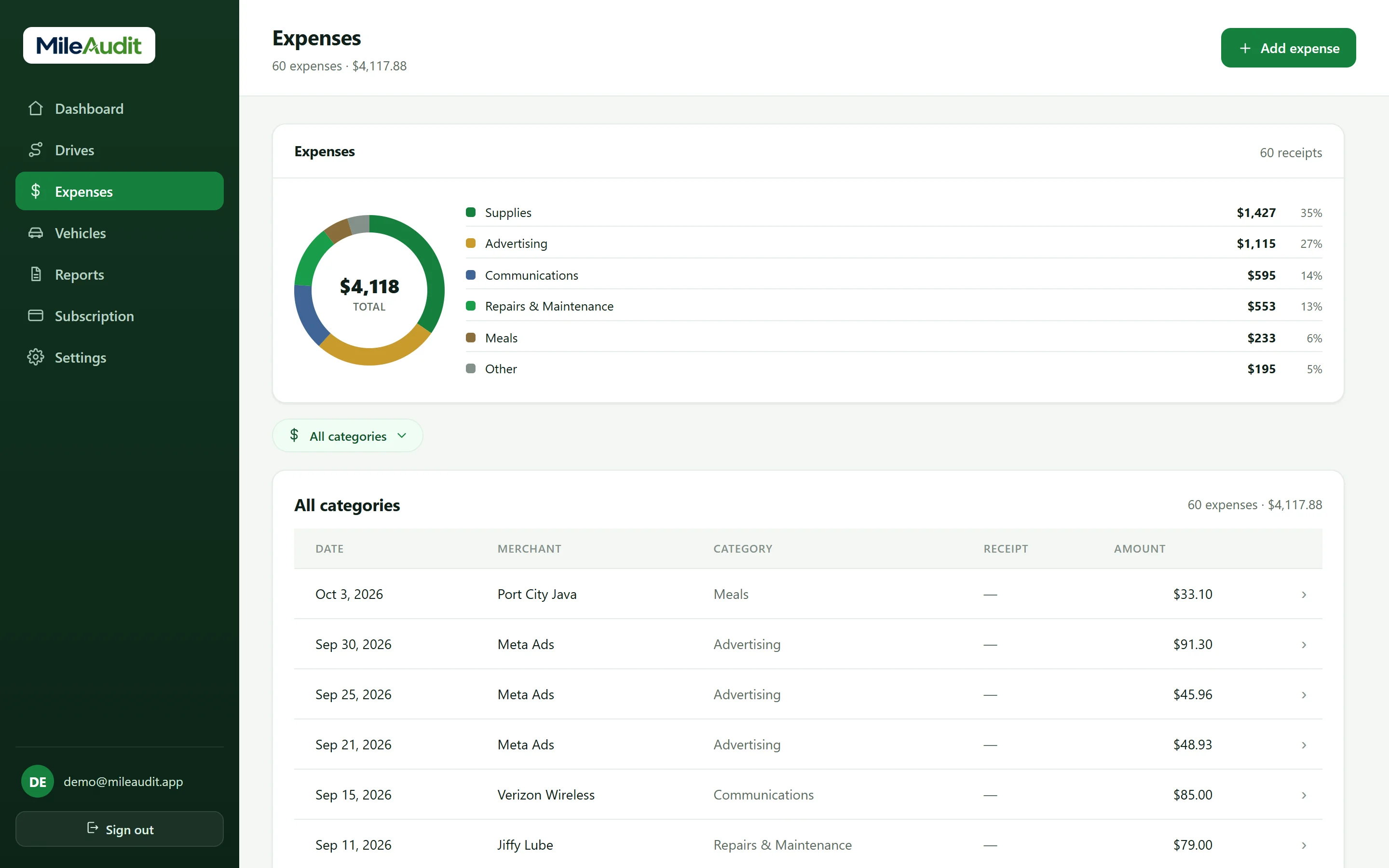
Snap the receipt. Skip the shoebox.
Business expenses live right next to your mileage. Scan a paper receipt with your phone and MileAudit crops it, reads it, and fills in the details for you to confirm.
-
Scan & auto-fillThe receipt is auto-cropped and the merchant, amount, and date are read on your phone — the image never leaves it for reading.
-
Tax-friendly categoriesSort expenses into Schedule C–style categories like Supplies, Meals, and Advertising — or create your own.
-
Receipts stored privatelyReceipt images are kept in private, per-account storage and sync between your phone and the web.
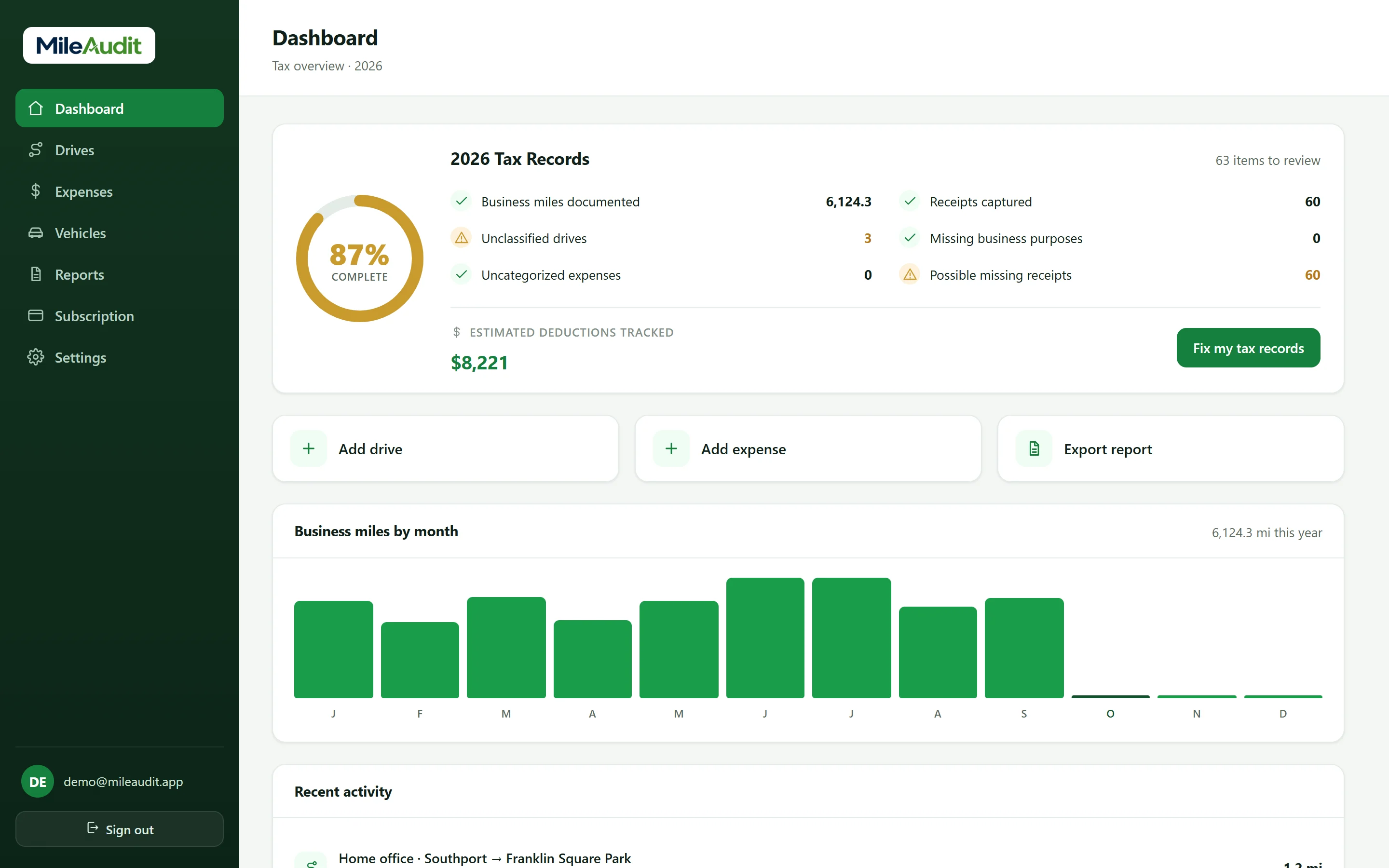
See it with a full year of sample data.
Open the real MileAudit dashboard with a sample account — drives, expenses, reports and all. No sign-up, nothing to install.
How MileAudit works
Three steps. Most of them happen without you lifting a finger.
Drive and spend as usual
Drives are detected in the background. When you buy something for work, scan the receipt — it takes seconds.
Review in seconds
Mark drives business or personal and confirm expense details. MileAudit flags anything missing so nothing slips through.
Export at tax time
Download mileage and expense reports as PDF or CSV, with totals by category and vehicle, ready for your tax preparer.
Know your records are complete — before tax season.
MileAudit's Tax Health score checks your year for gaps: unclassified drives, missing purposes, uncategorized expenses, and receipts you may have forgotten.
-
Fix my records, step by stepA guided walkthrough takes you through each open item and fixes it in place.
-
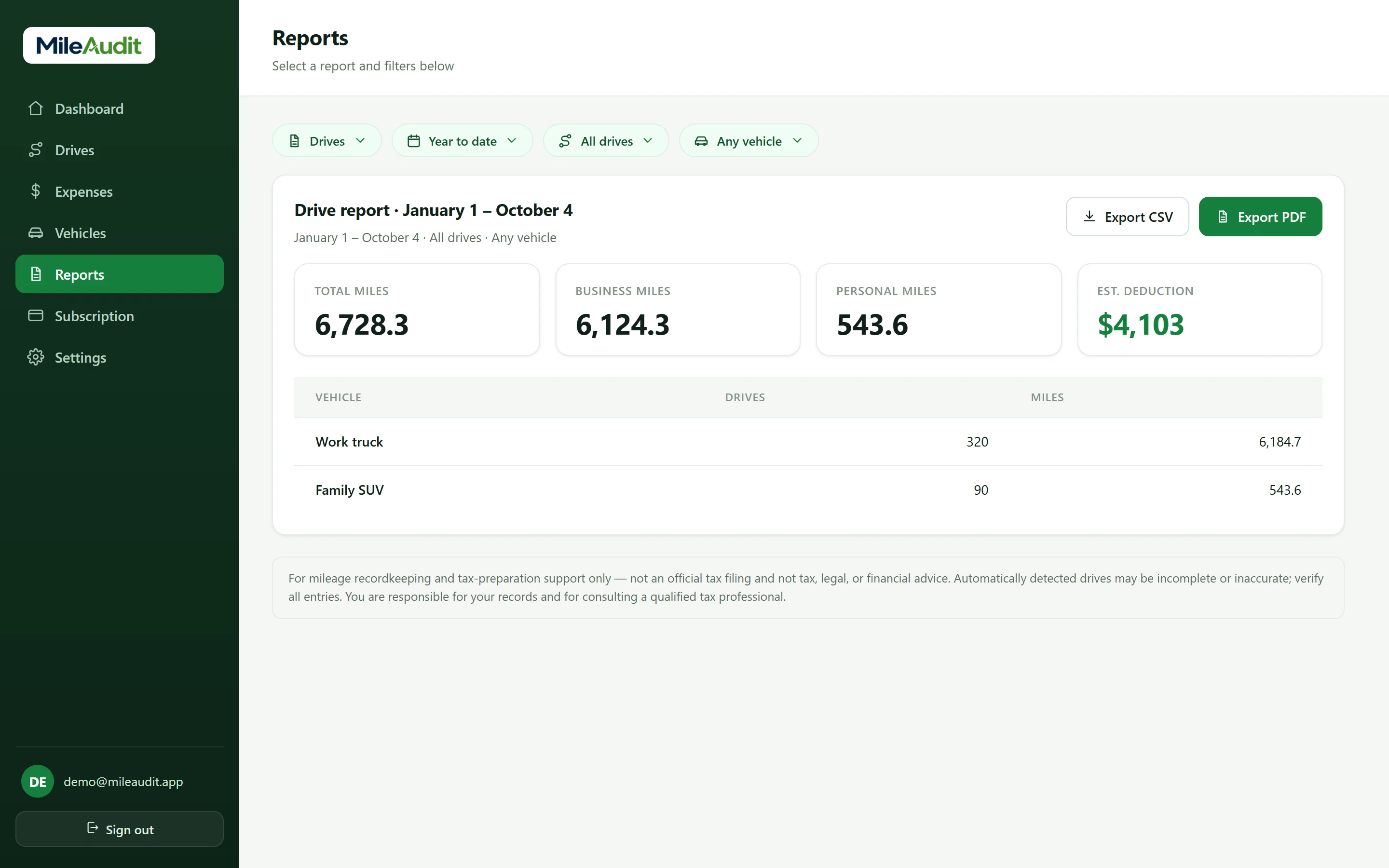
PDF & CSV reportsMileage reports by category and vehicle; expense reports by category — for any date range.
-
Phone and web, in syncCapture on the go, then review and export from the web dashboard on any computer.
Built for people who work on the go
If your car and your receipts are part of how you earn, they're worth tracking.
Self-employed & freelancers
Miles and expenses in one place, without the shoebox.
Rideshare & delivery
High-mileage weeks and fuel receipts add up fast.
Real estate agents
Showings, client drives, and marketing costs, organized.
Contractors, trades & construction
Job-site miles by vehicle, plus supply-run receipts.
Small business owners
One tidy set of records for you and your accountant.
Mileage reimbursement
Log work drives and get repaid by your employer or client.
Food & beverage
Supply runs, catering deliveries, and every ingredient receipt.
Nonprofits
Staff and volunteer drives, logged for reimbursement and records.
Forgotten miles and lost receipts cost you.
Unlogged business miles and missing receipts are money left on the table. MileAudit captures both as you go, so you can claim what you actually earned — with records to back it up.
- Automatic capture means fewer forgotten trips
- Scanned receipts mean fewer lost expenses
- Category totals make tax prep faster
*Example only, using the 72.5¢-per-mile IRS standard rate in effect at the start of 2026. Rates change, sometimes mid-year — MileAudit values each drive at the rate for its date. MileAudit is a recordkeeping tool and does not provide tax advice — confirm your rate and eligibility with a qualified professional.
Your data is yours
MileAudit needs your location to detect drives and your receipts to track expenses — we treat both as a responsibility, not a product to sell.
We never sell your data
Your drives, location history, and expenses are never sold or shared with advertisers.
Private receipts
Receipt text is read on your phone, and images are kept in private storage only your account can access.
Delete anytime
Turn tracking off whenever you like, and delete your account and data from the app.
Frequently asked questions
How does automatic drive detection work?
With your permission, MileAudit uses your device's location to detect when you're driving and records the trip automatically. Detected drives land in your review inbox, where you mark them business or personal.
How does receipt scanning work?
In the mobile app, tap Scan Receipt and point your camera at it. MileAudit detects the receipt's edges, crops it, and reads the merchant, amount, and date on your device to fill in the expense. You pick the category and confirm before saving. You can also attach a photo from your library, or add an expense by hand on the web.
What expense categories are included?
MileAudit includes common Schedule C–style categories such as Vehicle, Supplies, Advertising, Meals, Office Expenses, Utilities, and more. You can also add your own custom categories.
Why does the app need background location?
To detect drives without you opening the app each time, MileAudit needs location access while it runs in the background. You can turn tracking on or off anytime, or decline the permission and add drives manually.
Will it drain my battery?
MileAudit is designed to sample location efficiently and only while it's helpful for detecting drives. You can disable background tracking at any time.
How do I get my records out?
Open Reports, pick a date range, and export your mileage or expense report as a PDF or CSV — with totals by category and vehicle, ready to share with your tax preparer.
How much does MileAudit cost?
One plan with everything included: $89.99 per year or $10.99 per month, with a 7-day free trial. See the pricing page for details.
Is MileAudit a tax-filing service?
No. MileAudit helps you keep mileage and expense records and prepare them for tax time. It is not a tax-filing service and does not provide tax advice — please consult a qualified professional.
Start tracking miles and expenses today
Try MileAudit free for 7 days on the web now, and bring your account to the iPhone and Android apps when they land.
Start your free trialAbout MileAudit
MileAudit is built and operated by Justus Outdoors LLC, a company based in Southport, North Carolina. We build simple, privacy-respecting tools that help self-employed people and small businesses keep accurate, tax-ready mileage and expense records.
Questions, support, or account help? Email us at admin@mileaudit.com.